Introduce your campsite
List your campsite on LycamPe: how it works
A small campsite on the edge of a village, pitches among the trees or a few motorhome spaces: show guests what makes your place special. Listing your campsite on LycamPe is completely free. Start with an account, then add your details, pitches and available dates.
Create an account and add your campsite step by step.
At a glance
From your first account to a campsite guests can book
Register and prepare
Create your account, confirm your email and add your campsite, photos and pitches. Your campsite is not online at this stage.
Approval by LycamPe
LycamPe reviews your host account. Approval lets you publish your campsite; you decide when to do so.
Online and ready for bookings
Finish preparing your listing and complete the payment checks, then publish your campsite yourself. Check availability and go through the booking steps as a guest would.
Take a closer look at LycamPe
Get your campsite ready, step by step
Your dashboard shows which details you have already filled in. Add your pitches, photos and prices, then check your campsite page before publishing it.
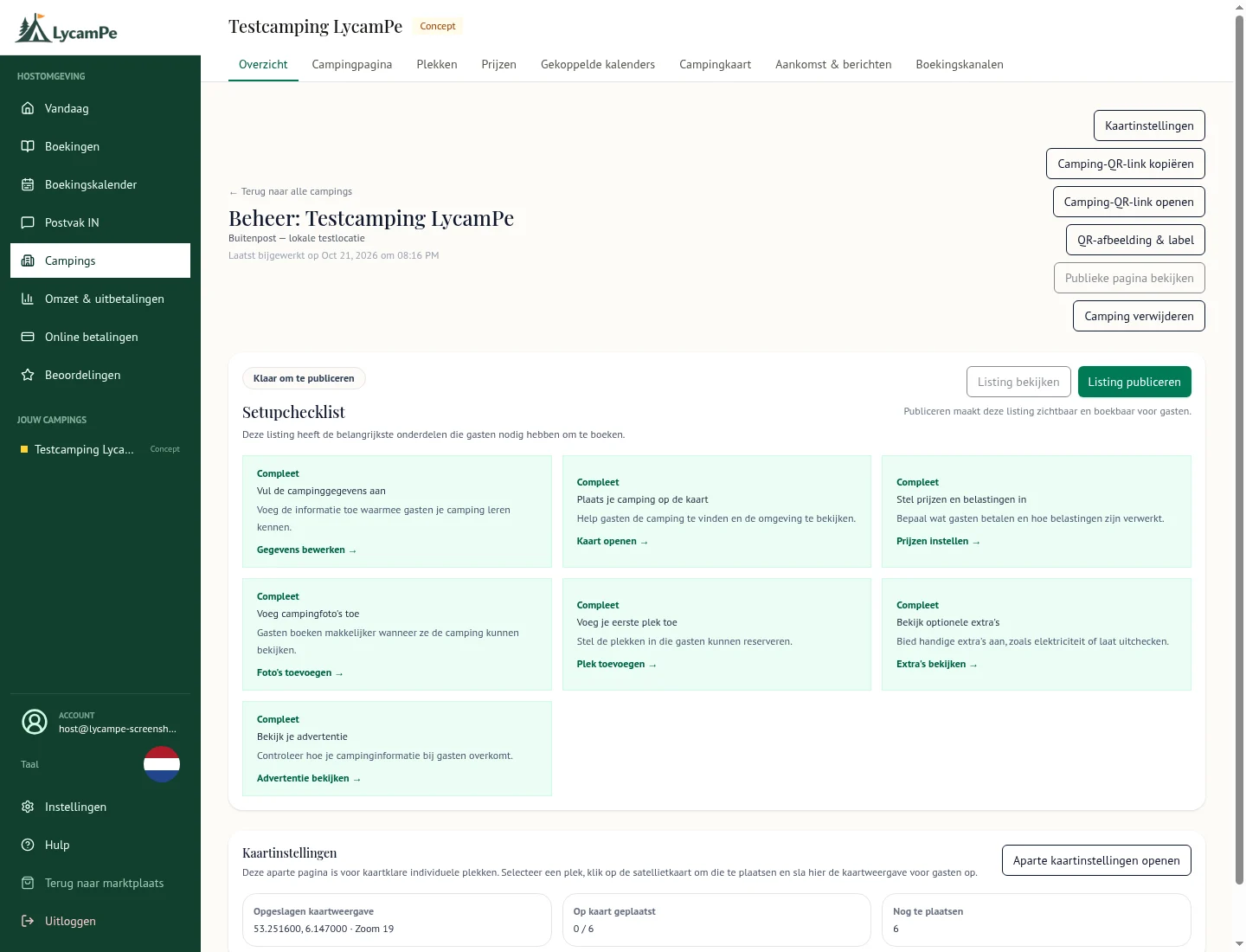
A screenshot of the real LycamPe interface using test data. Names, bookings and amounts are fictional. The interface shown is in Dutch.
View the larger image (new tab)Create an account
Register as a campsite owner using an email address you check regularly. You will receive an email asking you to confirm it. You can then log in and start filling in your campsite details.
Already have a LycamPe guest account? Log in with it and choose to register your campsite. You can then request access as a campsite owner. If you have already registered as an owner, continue with your existing campsites.
Tell guests what to expect
Have your campsite name, address, description and photos ready. Explain what a stay with you is like: how guests arrive, what their pitch offers and the house rules you ask them to follow. Photos of your own site help bring that to life.
Mention anything useful to know beforehand. That might be a narrow access road, the months you are open or a field suitable only for tents. It helps guests choose a pitch that suits them.
Add your pitches
Choose the pitches you want to let and set the nightly price. For each one, specify whether it suits a tent, caravan or motorhome and how many guests it accommodates. You can start with just part of your site.
Set the periods when you are open and keep any dates free that you need for yourself. Then look at what a guest will see: is it clear which pitch they are booking and when they are welcome?
Get your campsite ready for bookings
LycamPe needs to approve your account first. You can then publish your campsite yourself. Your campsite overview shows which steps you still need to complete before guests can book.
The payment provider needs additional details for payouts and will check them. In the meantime, you can continue working on your photos, description and pitches. Prepare everything at your own pace.
Look at your campsite as a guest would
Go through the photos, description, prices and available pitches once more. Are your opening dates right? Is it clear which costs are part of the stay? Can a guest find out how to reach your campsite?
Publish your campsite when everything is ready and the required checks are complete. Then look at your public campsite page. If something changes on site, update the information on LycamPe too.
Already have an account? Pick up where you left off
Log in to continue setting up your campsite. You will find the details you have already entered and can add to or change them. You do not have to finish your campsite page in one sitting.
Have a question first? Get in touch and tell us about your site. The costs page explains free listing, setting your own prices and what a guest pays when booking.
Ready to get your campsite started?
Listing your campsite is completely free. Create an account and add your photos, pitches and prices.