LycamPe for small campsites
Online bookings for your small campsite, with simple management
Guests come for your setting and your welcome. LycamPe helps you organise the bookings around them: online reservations, phone bookings, available pitches and your opening season. Keep a clear overview, in a way that suits a small campsite.
Create an account and add your campsite step by step.
At a glance
Your campsite essentials in one place
Your own pitches
Offer the pitches that suit your site.
Online and by phone
Add the reservations you agree by phone too.
Your season
Set your opening dates and block pitches when needed.
Your own website
Add a booking form to your campsite website.
Take a closer look at LycamPe
See which pitches are free at a glance
The booking calendar shows reservations alongside blocked dates. You can see what is planned for each pitch, including bookings you have added yourself.
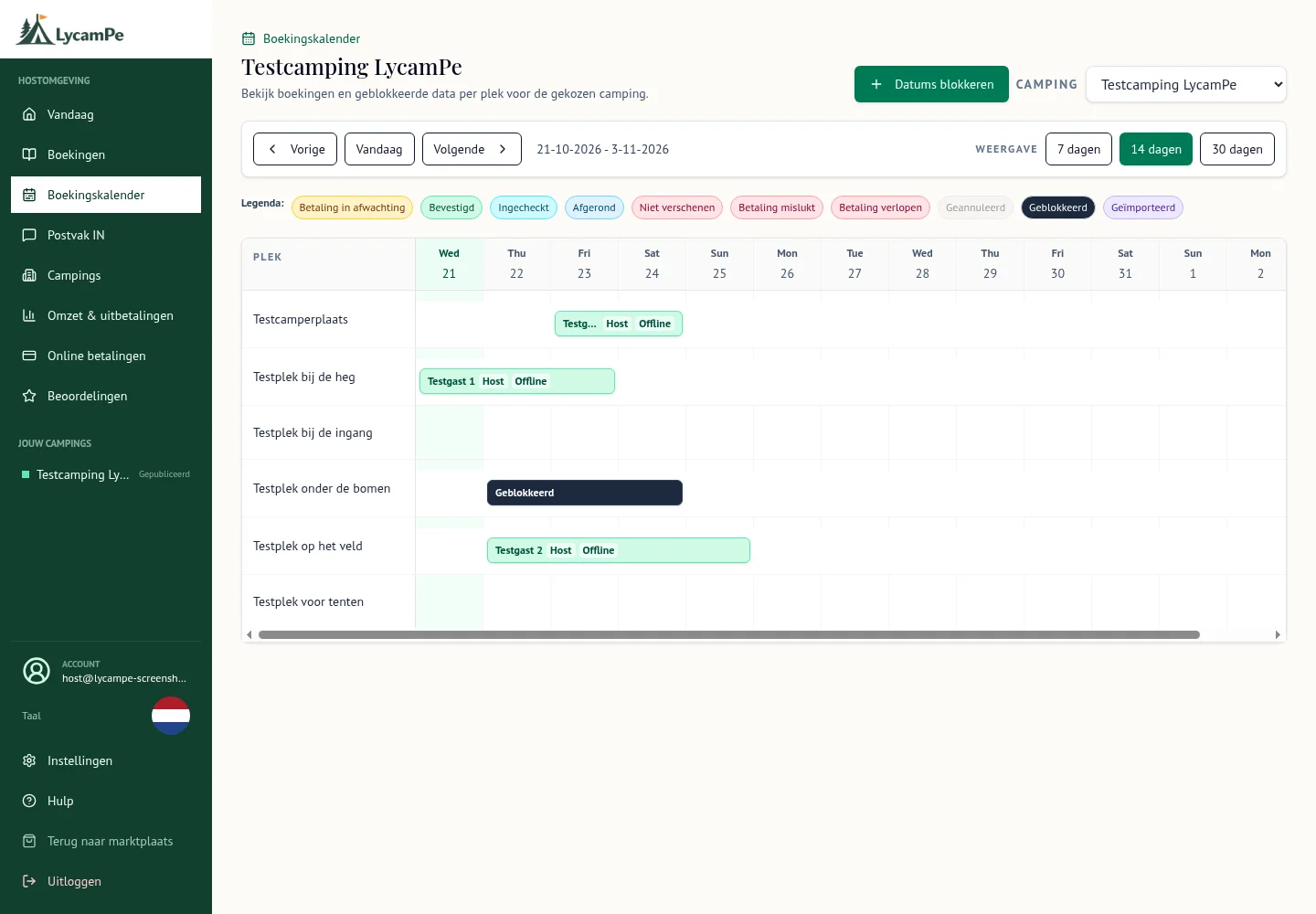
A screenshot of the real LycamPe interface using test data. Names, bookings and amounts are fictional. The interface shown is in Dutch.
View the larger image (new tab)Your pitches, easy to recognise
You know which pitch suits a tent and where a motorhome can park comfortably. In LycamPe, give each pitch a familiar name and add what it accommodates, the nightly price and the dates it is available.
Guests get a clearer idea of what they are booking. You can recognise the pitches on screen just as you do on site. That also helps when someone else takes care of the reservations for a day.
Online bookings and the familiar phone call
A new guest books online; a regular would rather call. Add reservations agreed by phone or at reception yourself in LycamPe. They then appear alongside the bookings made through the website.
Enter the reservation as soon as you have agreed it with your guest. You can then see which pitches are still free, and your partner or a member of staff can keep track too.
Choose when to welcome guests
Opening part of the site later, keeping a pitch free for maintenance or preparing for next season: you decide when guests can stay. Set your opening dates and temporarily close pitches to bookings when you need to.
You do not have to put your whole campsite online at once. Start with the pitches you want to offer, add their prices and available dates, and include more later.
Add your campsite step by step
Create an account, confirm your email address and fill in your campsite details. Then add your pitches, prices and available dates. Your own photos give guests a first impression of a stay with you.
Before your campsite becomes visible, LycamPe needs to approve your account and you need to publish the campsite yourself. To receive payments, your payment details must also be checked. Once logged in, you can see which steps are still needed.
Take bookings through your own website too
Already have a website? Keep your story and photos right where they are. Once your campsite is published on LycamPe, you can add a booking form to your own site. It shows the pitches, prices and available dates you manage in LycamPe.
Specify the website address where the form may appear. Our page about bookings on your own website explains how you or the person looking after your site can add it.
Already use a reservation system? If it supports calendar links (iCal), you can exchange blocked dates with LycamPe and keep using your existing system. The calendars are updated at intervals.
A practical idea from Buitenpost
LycamPe is based in Buitenpost in the Netherlands. We focus on owners of small campsites and motorhome stopovers: people who know their site and enjoy welcoming their guests personally.
Listing your campsite on LycamPe is completely free. Create an account and show what makes your site special. Have a question about what is possible? Get in touch.
Ready to get your campsite started?
Listing your campsite is completely free. Create an account and add your photos, pitches and prices.