For motorhome stopovers
Manage your motorhome stopover and take online bookings
Reserve a space before travelling, scan a QR code on arrival or arrange an overnight stay with you in person: LycamPe supports all three. Keep track of available motorhome spaces and add stays you agree directly to the same overview. A QR code opens the booking page on your guest’s phone.
Create an account and add your campsite step by step.
At a glance
A clear offer for guests on the road
Book ahead
Let guests reserve an available space before setting off.
Scan and book
Let guests open the booking page with a QR code on site.
Add arrivals yourself
Enter stays you agree with guests on arrival.
Clear arrival details
Explain where to go and how to find the right space.
Take a closer look at LycamPe
Let your guest choose a pitch on the map
For individually bookable pitches placed on the map, guests can see the location, photo and price. Their chosen pitch also appears in the booking summary.

A screenshot of the real LycamPe interface using test data. Names, bookings and amounts are fictional. The interface shown is in Dutch.
These example pitches have been placed on grassland near Buitenpost for this demonstration. This is not a real campsite.
Example photos taken in the Netherlands, via Unsplash: Geert Rozendom / Haberdoedas · Photo sources and licence
View the larger image (new tab)Let guests reserve a space before travelling
A motorhome guest looking for an overnight stop wants to know quickly whether there is room on the date they need. Keep your available spaces up to date and close any you cannot use temporarily, for example during maintenance.
Offer individual motorhome spaces, or track how many are available within a group of similar spaces. Choose the approach that suits your site and set the months or days when you welcome guests.
Let guests book using a QR code
A QR code on your site lets guests open the booking page by scanning it with their phone. You can use a code for the whole site. An individual space can have its own code only when it is available to book individually and has QR booking enabled. If you manage a group of similar spaces, use the code for the whole site.
Put the code somewhere easy to spot and try it yourself with a phone. Add a short explanation about arrival. The code helps guests make a reservation; you still arrange access to the site and their welcome.
Add guests who book on arrival too
Has a guest arrived looking for somewhere to stay? Agree where they can park and enter the stay yourself in LycamPe. It then appears alongside the reservations made online.
Do this as soon as you have agreed the space. Your overview will show which spaces are occupied, helping you avoid offering one you have just assigned to someone else.
Take a closer look at LycamPe
A QR sign for guests arriving on site
Download a QR image or sign from your host dashboard. Guests on site can use it to open the booking page. Which pitches they can book depends on your settings and availability.
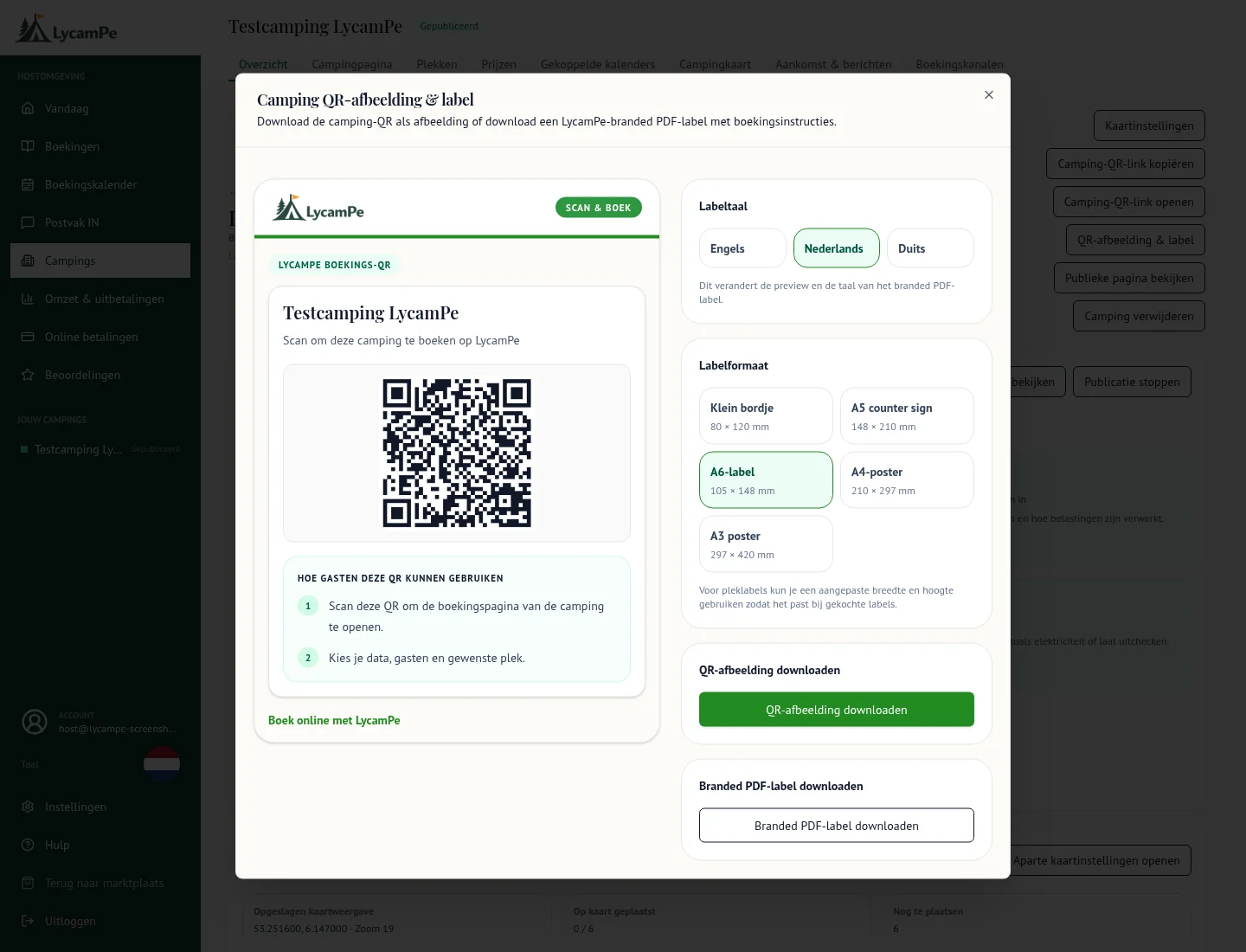
A screenshot of the real LycamPe interface using test data. Names, bookings and amounts are fictional. The interface shown is in Dutch.
This QR label belongs to the local test campsite and cannot be used to book a stay.
View the larger image (new tab)Help guests choose a suitable space
Describe your motorhome spaces: how large are they, what is the ground surface and which facilities are available? Explain how guests drive onto the site too. They can then judge whether it suits their vehicle before arriving.
If you offer motorhome spaces individually, guests can choose a specific space from the pitch view or, if you have set it up, on the map. Near the entrance or away from busy areas: recognisable names and photos show guests what they are reserving. With a group of similar spaces, the guest books capacity within that group rather than a fixed pitch number.
Help guests find their way
Explain where guests should report on arrival and what they need to know about staying with you. Include how to find the entrance and how to identify the space reserved for them.
Think of someone visiting for the first time: is it clear where to go and who to ask if they need help? A short explanation beforehand can save a lot of searching.
A clear price for a short stop
For a stay of one or two nights, every part of the price matters. Check the total for your motorhome space, including the extras, tax and any booking fees you have set up. You can then see the amount shown to a guest when booking.
Listing your motorhome stopover on LycamPe is completely free. Start with your location and first space. A clear price and useful arrival information help guests plan their overnight stop.
Ready to get your campsite started?
Listing your campsite is completely free. Create an account and add your photos, pitches and prices.