Daily campsite management
A simple booking system for your campsite
Which pitch is free, who is arriving and what have you agreed by phone? The LycamPe booking system brings that information together. Manage the pitches on your campsite, add bookings you take directly and let guests reserve a stay online.
Create an account and add your campsite step by step.
At a glance
A starting point for your daily campsite work
Your pitches
Specify what each pitch suits and how many are available.
Your reservations
Add phone bookings yourself.
Open or unavailable
Manage your season and temporary closures.
On your website too
Use the same pitch information in your booking form.
Take a closer look at LycamPe
See which pitches are free at a glance
The booking calendar shows reservations alongside blocked dates. You can see what is planned for each pitch, including bookings you have added yourself.
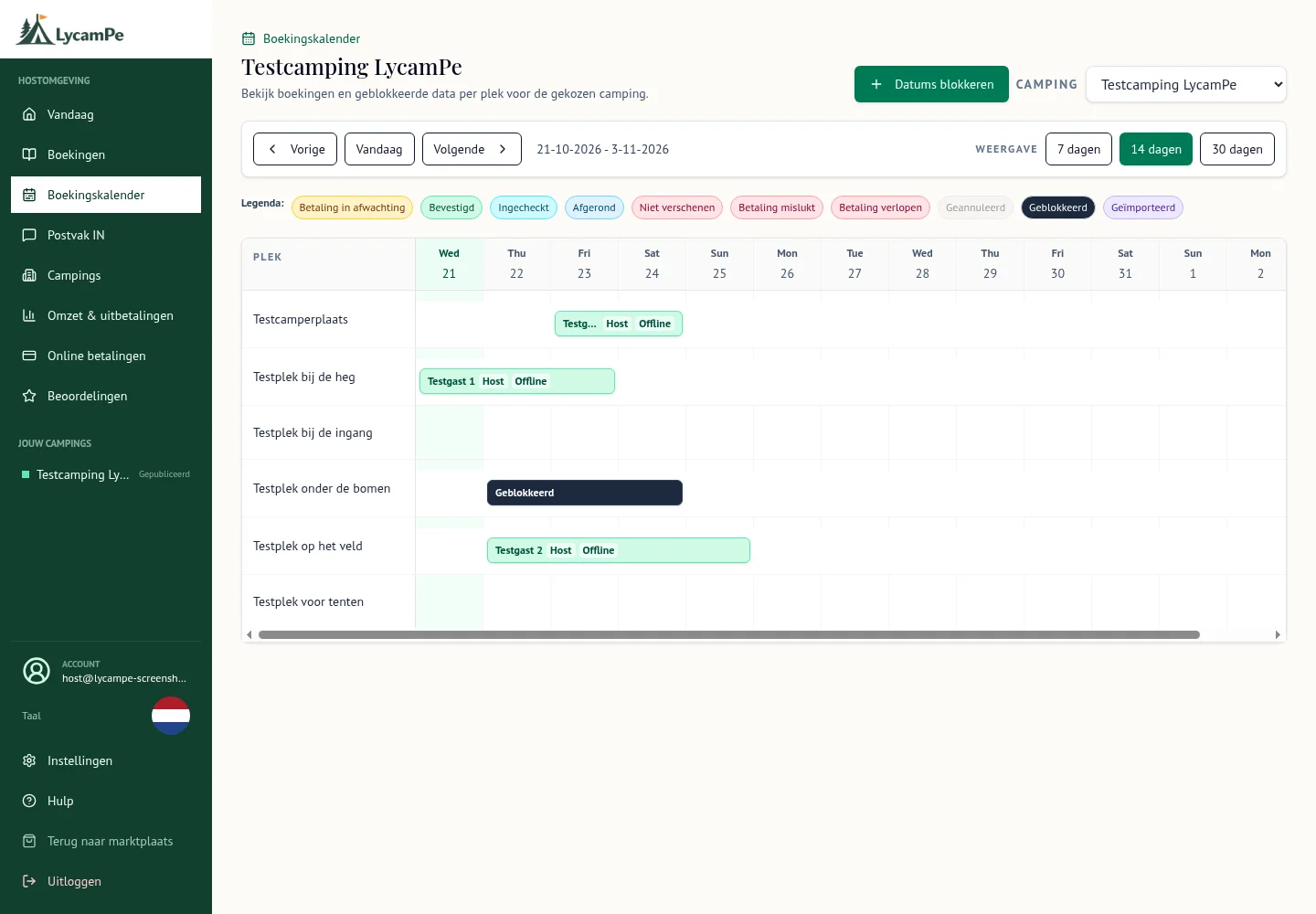
A screenshot of the real LycamPe interface using test data. Names, bookings and amounts are fictional. The interface shown is in Dutch.
View the larger image (new tab)A suitable pitch for each guest
A tent needs a different pitch from a large motorhome. For each pitch, specify the camping vehicles or tents it can accommodate and the number of guests. Familiar names help you tell your pitches apart on screen too.
You can offer individual pitches or keep track of how many are available within a group of similar pitches. Choose the approach that suits your site and check the settings before accepting bookings.
Online and phone bookings together
Guests can reserve an available pitch through LycamPe. If you agree a booking by phone or at reception, add it yourself. Both kinds of reservation then appear in the same planning overview.
A guest calls while you are getting ready for an arrival. Agree a pitch and dates, then add the reservation yourself. It appears in your planning alongside online bookings. Whoever takes over welcoming guests later can see which pitch you have agreed.
Open when it suits your campsite
Set your opening periods and close pitches for particular dates. That is useful when a field opens later, maintenance is needed or you want to keep a pitch for your own use.
Use the opening period settings and pitch blocks for this. Your planning can then show what a guest has booked and what you are keeping unavailable for another reason.
Take a closer look at LycamPe
Place your pitches on the map
Give each individually bookable map pitch a position. Guests can then see where it is and choose an available pitch that suits their stay.
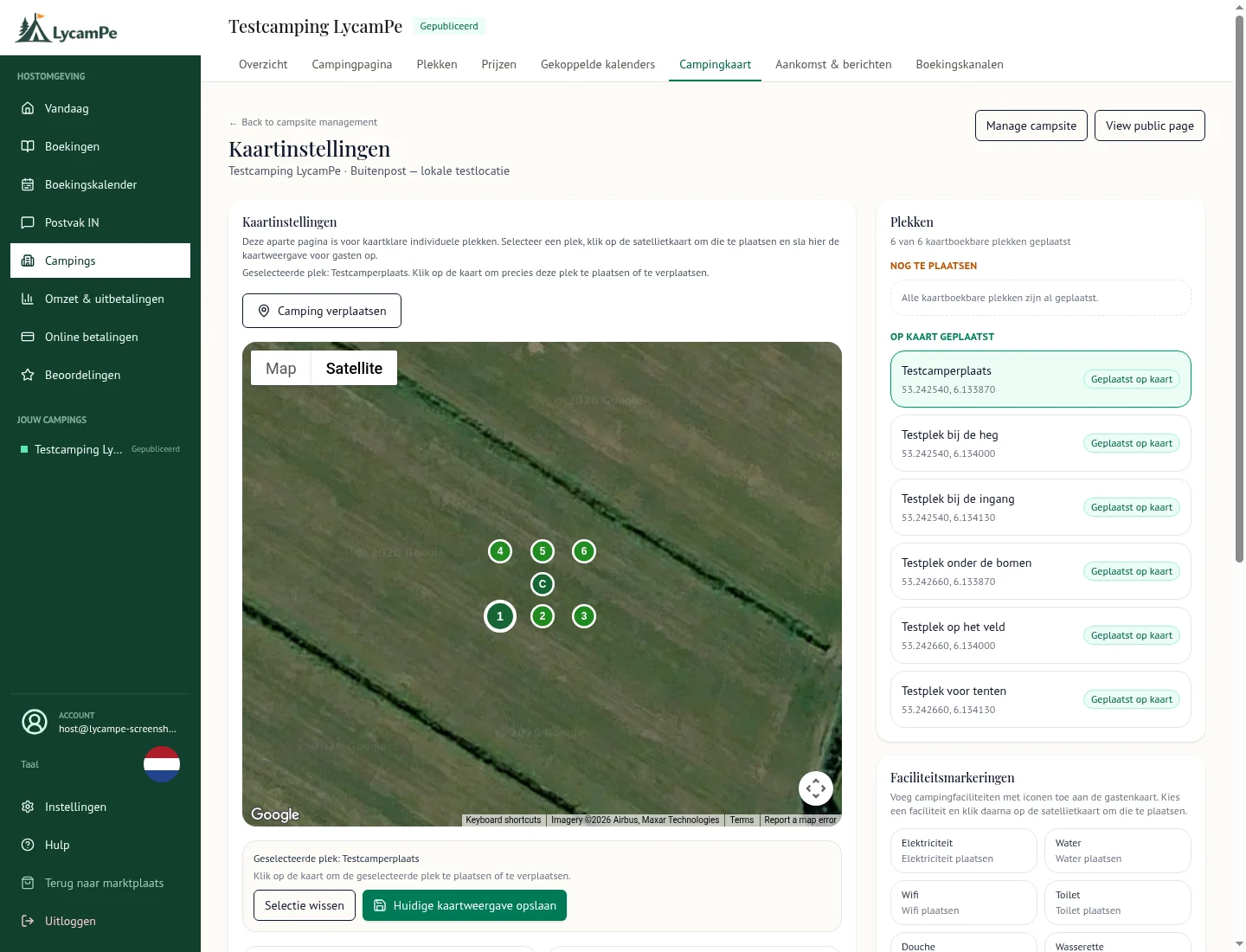
A screenshot of the real LycamPe interface using test data. Names, bookings and amounts are fictional. The interface shown is in Dutch.
These example pitches have been placed on grassland near Buitenpost for this demonstration. This is not a real campsite.
View the larger image (new tab)Get your prices ready for the season
Set your accommodation prices and add the extras guests can book with you. Check the total for different stays: a single night, a longer holiday and a booking with extra guests can work out differently.
Include any taxes and compulsory charges that apply. Checking the full price beforehand helps you understand what a guest sees when booking. You still keep your own accounts separately.
Use it with your website and other calendars
You can add the LycamPe booking form to your own website. It uses the same pitches, prices and available dates. If you use other booking calendars, you can connect them to LycamPe through a calendar link, also known as iCal.
Linked calendars are updated at intervals. A change does not always appear immediately in the other calendar. Check when the information was last retrieved and allow for that delay if you take bookings on several websites.
Start with an ordinary day on site
What do you need to look up most often on a busy day? An available pitch, a phone booking or a period when you are closed? Start by setting up those pitches and dates, then look at what a guest will see.
Small campsites and motorhome stopovers have their own practical needs. Read the page for your type of site, or create an account to prepare your campsite page and first pitches.
Ready to get your campsite started?
Listing your campsite is completely free. Create an account and add your photos, pitches and prices.